Each week I'll name a bird species, usually on Sunday morning, usually an ABA Code 1 species. You're invited to post the photo you think is your best or most favorite of that species. The guideline is only one photo per species per week, please. On those occasions when I name more than one species, you're welcome to post one photo of each species. Once the next species is posted, the submission period for the previous species is over.
Okay, gang, let's start with a common one!
American Robin
Photo Species of the Week
-
Charlie Spencer

- Posts: 313
- Joined: Wed Jan 07, 2026 8:08 pm
- Location: Sunset Harbor, North Carolina
- Has thanked: 655 times
- Been thanked: 410 times
- Contact:
-
Bering Birder
- Posts: 149
- Joined: Wed Jan 07, 2026 12:36 am
- Been thanked: 303 times
Re: Photo Species of the Week
You do not have the required permissions to view the files attached to this post.
-
Lonestranger

- Posts: 575
- Joined: Wed Jan 07, 2026 9:48 am
- Location: Waterloo region, Ontario, Canada
- Has thanked: 295 times
- Been thanked: 261 times
- Contact:
Re: Photo Species of the Week
April 2022, the American Robin preened for a few minutes and provided the camera with a few different feather arrangements, this was my favourite.
Cropping the photo to 1936x1291 left me with a 2MB file size that was too large to upload. Lowering the quality to 99% during export reduced the file size substantially from 2MB down to 582kb.
Cropping the photo to 1936x1291 left me with a 2MB file size that was too large to upload. Lowering the quality to 99% during export reduced the file size substantially from 2MB down to 582kb.
You do not have the required permissions to view the files attached to this post.
-
Greyhawk

- Site Admin
- Posts: 654
- Joined: Tue Jan 06, 2026 11:51 am
- Location: North Texas
- Has thanked: 153 times
- Been thanked: 290 times
- Contact:
Re: Photo Species of the Week
As time goes on and I get a feel for our disk usage versus the available space, I may increase the limit.Lonestranger wrote: Sun Jan 11, 2026 3:25 pm Cropping the photo to 1936x1291 left me with a 2MB file size that was too large to upload. Lowering the quality to 99% during export reduced the file size substantially from 2MB down to 582kb.
Your photo looks great as posted.
My feeder cam:
https://www.youtube.com/@johnakkaarrh4142/live
https://www.youtube.com/@johnakkaarrh4142/live
-
lonesome55dove
- Posts: 108
- Joined: Sat Jan 10, 2026 12:15 am
- Location: The Pacific Northwest, South Central Washington
- Has thanked: 351 times
- Been thanked: 223 times
- Contact:
Re: Photo Species of the Week
Good morning everyone...
Happy to see this thread back up. Thank you to @Greyhawk and @Charlie Spencer.
Could someone please tell me how to post a photo? Thank you!!
Happy to see this thread back up. Thank you to @Greyhawk and @Charlie Spencer.
Could someone please tell me how to post a photo? Thank you!!
Klickitat County, Washington, USA
-
Charlie Spencer
- Posts: 313
- Joined: Wed Jan 07, 2026 8:08 pm
- Location: Sunset Harbor, North Carolina
- Has thanked: 655 times
- Been thanked: 410 times
- Contact:
Re: Photo Species of the Week
I've found a couple of methods but let's start with where the desired photos are stored. What garbage can are you wanting to pull them out of?lonesome55dove wrote: Sun Jan 11, 2026 6:36 pm Could someone please tell me how to post a photo? Thank you!!
Sunset Harbor NC USA
-
lonesome55dove
- Posts: 108
- Joined: Sat Jan 10, 2026 12:15 am
- Location: The Pacific Northwest, South Central Washington
- Has thanked: 351 times
- Been thanked: 223 times
- Contact:
Re: Photo Species of the Week
I can use Flickr or Google Photos.Charlie Spencer wrote: Sun Jan 11, 2026 6:52 pmI've found a couple of methods but let's start with where the desired photos are stored. What garbage can are you wanting to pull them out of?lonesome55dove wrote: Sun Jan 11, 2026 6:36 pm Could someone please tell me how to post a photo? Thank you!!
Klickitat County, Washington, USA
-
Charlie Spencer
- Posts: 313
- Joined: Wed Jan 07, 2026 8:08 pm
- Location: Sunset Harbor, North Carolina
- Has thanked: 655 times
- Been thanked: 410 times
- Contact:
Re: Photo Species of the Week
Okay, we'll have to wait for someone else to respond. I'm not familiar with either of those.
Your call is important to us. Please remain on the line.
Sunset Harbor NC USA
-
lonesome55dove
- Posts: 108
- Joined: Sat Jan 10, 2026 12:15 am
- Location: The Pacific Northwest, South Central Washington
- Has thanked: 351 times
- Been thanked: 223 times
- Contact:
Re: Photo Species of the Week
I'm up for an alternative program if you would like to recommend one. Thank you, I appreciate your help.Charlie Spencer wrote: Sun Jan 11, 2026 7:03 pmOkay, we'll have to wait for someone else to respond. I'm not familiar with either of those.
Your call is important to us. Please remain on the line.
Lol!
Klickitat County, Washington, USA
-
Charlie Spencer
- Posts: 313
- Joined: Wed Jan 07, 2026 8:08 pm
- Location: Sunset Harbor, North Carolina
- Has thanked: 655 times
- Been thanked: 410 times
- Contact:
Re: Photo Species of the Week
I have no suggestions. I only share my photos as attachments to my eBird checklists. They're viewable there or in the associated Macaulay library. I don't use any of the popular photo sharing services so I can't make any recommendations.lonesome55dove wrote: Sun Jan 11, 2026 7:26 pm I'm up for an alternative program if you would like to recommend one. Thank you, I appreciate your help.
Lol!
Your call will be handled in the order in which it was received. All of our technicians are busy helping other forum members. Please remain on the line.
Sunset Harbor NC USA
-
lonesome55dove
- Posts: 108
- Joined: Sat Jan 10, 2026 12:15 am
- Location: The Pacific Northwest, South Central Washington
- Has thanked: 351 times
- Been thanked: 223 times
- Contact:
Re: Photo Species of the Week
Ok, thanks again. I don't use eBird. I'll try to figure it out.Charlie Spencer wrote: Sun Jan 11, 2026 7:38 pmI have no suggestions. I only share my photos as attachments to my eBird checklists. They're viewable there or in the associated Macaulay library. I don't use any of the popular photo sharing services so I can't make any recommendations.lonesome55dove wrote: Sun Jan 11, 2026 7:26 pm I'm up for an alternative program if you would like to recommend one. Thank you, I appreciate your help.
Lol!
Your call will be handled in the order in which it was received. All of our technicians are busy helping other forum members. Please remain on the line.
Klickitat County, Washington, USA
-
aveschapinas

- Posts: 83
- Joined: Wed Jan 07, 2026 4:47 pm
- Location: Quetzaltenango, Guatemala
- Has thanked: 142 times
- Been thanked: 186 times
Re: Photo Species of the Week
I drag the photo from my computer to the edit window. Then options appear at the bottom, one is "place inline" and the other is something like "delete file"; I click on place inline and the photo appears when you submit the post. An option maybe until you figure out how to use the photo apps?
-
Greyhawk
- Site Admin
- Posts: 654
- Joined: Tue Jan 06, 2026 11:51 am
- Location: North Texas
- Has thanked: 153 times
- Been thanked: 290 times
- Contact:
Re: Photo Species of the Week
I you have the file on your computer, you can use the "Attachment" tab in the lower left of the posting box. After it is uploaded, you can use the "Place inline" button to make it appear in the body of the post.lonesome55dove wrote: Sun Jan 11, 2026 6:36 pm Good morning everyone...
Happy to see this thread back up. Thank you to @Greyhawk and @Charlie Spencer.
Could someone please tell me how to post a photo? Thank you!!
At the bottom right of a Flickr photo, there is a right-pointing arrow symbol for "Share Photo", Click on it, in the pop-up box click the BBCode tab, copy everything in the box and paste it in your post. I'll put that in a sticky post in this sub-forum soon.
My feeder cam:
https://www.youtube.com/@johnakkaarrh4142/live
https://www.youtube.com/@johnakkaarrh4142/live
-
Aidan B

- Posts: 151
- Joined: Thu Jan 08, 2026 5:43 pm
- Location: Humboldt County, California
- Has thanked: 109 times
- Been thanked: 378 times
Re: Photo Species of the Week
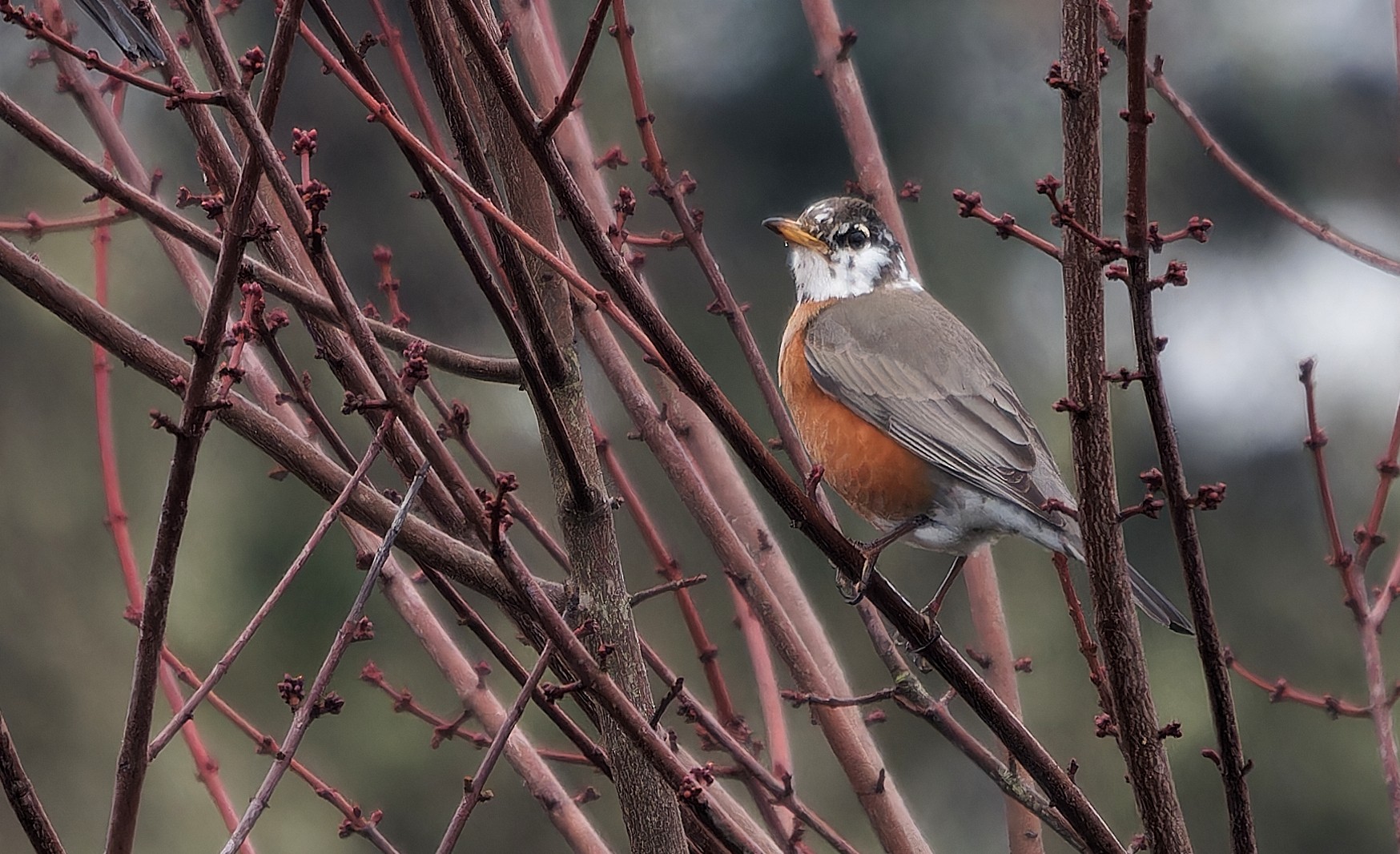
Not my sharpest picture of a Robin, but definitely the coolest one I've seen.
-
Greyhawk
- Site Admin
- Posts: 654
- Joined: Tue Jan 06, 2026 11:51 am
- Location: North Texas
- Has thanked: 153 times
- Been thanked: 290 times
- Contact:
Re: Photo Species of the Week
You can also use the "Preview" button to see what it looks like before you submit.aveschapinas wrote: Sun Jan 11, 2026 7:48 pm I click on place inline and the photo appears when you submit the post
My feeder cam:
https://www.youtube.com/@johnakkaarrh4142/live
https://www.youtube.com/@johnakkaarrh4142/live
-
lonesome55dove
- Posts: 108
- Joined: Sat Jan 10, 2026 12:15 am
- Location: The Pacific Northwest, South Central Washington
- Has thanked: 351 times
- Been thanked: 223 times
- Contact:
-
lonesome55dove
- Posts: 108
- Joined: Sat Jan 10, 2026 12:15 am
- Location: The Pacific Northwest, South Central Washington
- Has thanked: 351 times
- Been thanked: 223 times
- Contact:
Re: Photo Species of the Week
Thank you! I appreciate your help. I finally figured it out.aveschapinas wrote: Sun Jan 11, 2026 7:48 pmI drag the photo from my computer to the edit window. Then options appear at the bottom, one is "place inline" and the other is something like "delete file"; I click on place inline and the photo appears when you submit the post. An option maybe until you figure out how to use the photo apps?
Klickitat County, Washington, USA
-
lonesome55dove
- Posts: 108
- Joined: Sat Jan 10, 2026 12:15 am
- Location: The Pacific Northwest, South Central Washington
- Has thanked: 351 times
- Been thanked: 223 times
- Contact:
Re: Photo Species of the Week
I figured it out. I did use the Flickr BBCode tab, it looks like my photo posted without any problems. I appreciate your help. Thank you!Greyhawk wrote: Sun Jan 11, 2026 7:54 pmI you have the file on your computer, you can use the "Attachment" tab in the lower left of the posting box. After it is uploaded, you can use the "Place inline" button to make it appear in the body of the post.lonesome55dove wrote: Sun Jan 11, 2026 6:36 pm Good morning everyone...
Happy to see this thread back up. Thank you to @Greyhawk and @Charlie Spencer.
Could someone please tell me how to post a photo? Thank you!!
At the bottom right of a Flickr photo, there is a right-pointing arrow symbol for "Share Photo", Click on it, in the pop-up box click the BBCode tab, copy everything in the box and paste it in your post. I'll put that in a sticky post in this sub-forum soon.
Klickitat County, Washington, USA
-
Lonestranger
- Posts: 575
- Joined: Wed Jan 07, 2026 9:48 am
- Location: Waterloo region, Ontario, Canada
- Has thanked: 295 times
- Been thanked: 261 times
- Contact:
Re: Photo Species of the Week
I successfully uploaded a Flickr photo by opening the photo, clicking the curved arrow/Share icon, and then selecting the BBCode in the Sharing options and then copy/paste that URL directly into the message box. There are options to select various sizes but haven't determined if there's a best size for all photos, or if size selection depends on each individual photo. If the photo won't load, try selecting a smaller image from the BBCode options.lonesome55dove wrote: Sun Jan 11, 2026 6:36 pm Good morning everyone...
Happy to see this thread back up. Thank you to @Greyhawk and @Charlie Spencer.
Could someone please tell me how to post a photo? Thank you!!
EDIT: I didn't see all the other responses when I replied. A day late and a dollar short again. I'll work on my timing.
-
Kansabirdguy
- Posts: 222
- Joined: Sun Jan 11, 2026 8:10 pm
- Location: Kansas
- Has thanked: 64 times
- Been thanked: 187 times
Re: Photo Species of the Week
One from a while back
You do not have the required permissions to view the files attached to this post.
EBird profile https://ebird.org/profile/MTM1OTQ2MA
-
lonesome55dove
- Posts: 108
- Joined: Sat Jan 10, 2026 12:15 am
- Location: The Pacific Northwest, South Central Washington
- Has thanked: 351 times
- Been thanked: 223 times
- Contact:
Re: Photo Species of the Week
No worries! A day late and a dollar short is my middle name, lol! I appreciate that you took the time to help. Thanks a bunch!Lonestranger wrote: Sun Jan 11, 2026 9:04 pmI successfully uploaded a Flickr photo by opening the photo, clicking the curved arrow/Share icon, and then selecting the BBCode in the Sharing options and then copy/paste that URL directly into the message box. There are options to select various sizes but haven't determined if there's a best size for all photos, or if size selection depends on each individual photo. If the photo won't load, try selecting a smaller image from the BBCode options.lonesome55dove wrote: Sun Jan 11, 2026 6:36 pm Good morning everyone...
Happy to see this thread back up. Thank you to @Greyhawk and @Charlie Spencer.
Could someone please tell me how to post a photo? Thank you!!
EDIT: I didn't see all the other responses when I replied. A day late and a dollar short again. I'll work on my timing.
That's what I enjoy most about this awesome group of folks, their willingness to help others.
Klickitat County, Washington, USA
-
Braxton L

- Posts: 49
- Joined: Thu Jan 08, 2026 3:57 pm
- Location: Orange County, California
- Has thanked: 41 times
- Been thanked: 141 times
Re: Photo Species of the Week
Are we starting fresh or continuing the list from the old forums? I know we've done robin beforeCharlie Spencer wrote: Sun Jan 11, 2026 11:14 am Each week I'll name a bird species, usually on Sunday morning, usually an ABA Code 1 species. You're invited to post the photo you think is your best or most favorite of that species. The guideline is only one photo per species per week, please. On those occasions when I name more than one species, you're welcome to post one photo of each species. Once the next species is posted, the submission period for the previous species is over.
Okay, gang, let's start with a common one!
American Robin

Re: Photo Species of the Week
[/quote]
No worries! A day late and a dollar short is my middle name, lol! I appreciate that you took the time to help. Thanks a bunch!
That's what I enjoy most about this awesome group of folks, their willingness to help others.
[/quote]
Hey LonesomeDove! Glad to see another whatbirder here!
No worries! A day late and a dollar short is my middle name, lol! I appreciate that you took the time to help. Thanks a bunch!
That's what I enjoy most about this awesome group of folks, their willingness to help others.
[/quote]
Hey LonesomeDove! Glad to see another whatbirder here!
-
Greyhawk
- Site Admin
- Posts: 654
- Joined: Tue Jan 06, 2026 11:51 am
- Location: North Texas
- Has thanked: 153 times
- Been thanked: 290 times
- Contact:
Re: Photo Species of the Week
Charlie decided to start over, which is fine.Braxton L wrote: Mon Jan 12, 2026 12:10 am Are we starting fresh or continuing the list from the old forums? I know we've done robin before
American Robin was the 9th bird of the week on the old forum, which would have been around January, 2021.
My feeder cam:
https://www.youtube.com/@johnakkaarrh4142/live
https://www.youtube.com/@johnakkaarrh4142/live
-
lonesome55dove
- Posts: 108
- Joined: Sat Jan 10, 2026 12:15 am
- Location: The Pacific Northwest, South Central Washington
- Has thanked: 351 times
- Been thanked: 223 times
- Contact:
Re: Photo Species of the Week
No worries! A day late and a dollar short is my middle name, lol! I appreciate that you took the time to help. Thanks a bunch!
That's what I enjoy most about this awesome group of folks, their willingness to help others.
[/quote]
Hey LonesomeDove! Glad to see another whatbirder here!
[/quote]
Hi Kevin! It's good to see you here. I'm glad I found the new site. I hope all of our Whatbirder friends find it too.
Last edited by lonesome55dove on Mon Jan 12, 2026 7:09 pm, edited 1 time in total.
Klickitat County, Washington, USA
-
stitch58
- Posts: 157
- Joined: Wed Jan 07, 2026 2:06 am
- Location: New Jersey
- Has thanked: 635 times
- Been thanked: 394 times
- Contact:
Re: Photo Species of the Week
You do not have the required permissions to view the files attached to this post.
-
Charlie Spencer
- Posts: 313
- Joined: Wed Jan 07, 2026 8:08 pm
- Location: Sunset Harbor, North Carolina
- Has thanked: 655 times
- Been thanked: 410 times
- Contact:
Re: Photo Species of the Week
I'll confirm previous posts; yes, we're starting over. I had the previous list but you'll recall I was having to post multiple species to be sure the combined ranges were wide enough that a majority of members would have photos. (Run-on sentence; sorry, Mrs. Cosgrove.)Braxton L wrote: Mon Jan 12, 2026 12:10 am Are we starting fresh or continuing the list from the old forums? I know we've done robin before
Sunset Harbor NC USA
Re: Photo Species of the Week
So excited to see this site is up and running!!
 American robin - Hilltop Reservation, NJ by stevebruenjes, on Flickr
American robin - Hilltop Reservation, NJ by stevebruenjes, on Flickr-
lonesome55dove
- Posts: 108
- Joined: Sat Jan 10, 2026 12:15 am
- Location: The Pacific Northwest, South Central Washington
- Has thanked: 351 times
- Been thanked: 223 times
- Contact:
Re: Photo Species of the Week
Good morning...
I was getting ready to make a ''blanket like'' post for all of the great Robin photos so far. However, I see we now have a ''Like" button.
Thank you to the powers that be for adding it.
I was getting ready to make a ''blanket like'' post for all of the great Robin photos so far. However, I see we now have a ''Like" button.
Thank you to the powers that be for adding it.
Klickitat County, Washington, USA